
Download ST TV APK – watch TV online, free TV app, streaming TV, mobile TV, desktop TV
Overview
ST TV is a multimedia application developed by Sat-Trakt doo designed to deliver live television content across a variety of devices. The software enables users to stream TV channels on portable devices such as smartphones and tablets, as well as desktop and laptop computers. Its primary purpose is to provide a convenient, cord-free alternative to traditional television viewing, allowing users to access a wide range of channels anytime and anywhere. The app is particularly suited for individuals seeking flexible entertainment options without the need for cable subscriptions or physical antennas.
Target users include casual viewers, travelers, remote workers, and anyone looking for a lightweight solution to watch live broadcasts on personal devices. Real-world usage scenarios include watching news updates during commutes, enjoying sports events on a laptop at home, or mirroring content from a mobile device to a larger screen for shared viewing. The software supports high-speed, high-definition video playback, which enhances the viewing experience when paired with a stable internet connection.
The developer did not provide additional details about the company’s background beyond the name. No specific licensing or content distribution policies were disclosed. Platform compatibility information is limited to the operating systems listed, with no further technical specifications provided.
Key Features & Capabilities
- Multi-Device Streaming – Users can access live TV channels on Android, iOS, Windows, and macOS devices, enabling consistent viewing across smartphones, tablets, laptops, and desktops.
- High-Definition Video Playback – The application delivers high-definition streaming quality, ensuring clear visuals and smooth playback when network conditions allow.
- Wide Channel Selection – ST TV offers access to a broad range of TV channels, covering genres such as news, sports, entertainment, and international programming.
- Flexible Viewing Options – Users can watch content on the go via mobile devices or mirror their screen to a desktop or laptop for a larger viewing experience.
- Minimal System Requirements – With a file size of 45 MB, the app is lightweight and suitable for devices with limited storage space.
Each feature supports real-world use cases, such as streaming live sports on a tablet during a break or mirroring a mobile screen to a desktop for family movie nights. The high-definition capability enhances visual clarity, especially on larger displays. The lightweight nature of the software makes it ideal for older or low-spec devices that may struggle with heavier applications. The app’s ability to function across multiple platforms ensures seamless transitions between devices without requiring account reconfiguration.
User Interface, Workflow & Performance
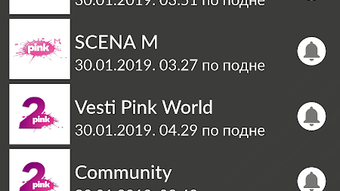
The user interface of ST TV is designed to be intuitive and user-friendly, allowing quick access to channels through a clean, organized layout. Navigation is straightforward, with categorized channel lists and a simple menu system that minimizes the learning curve for new users. The workflow is optimized for minimal steps between selecting a channel and starting playback, contributing to a smooth viewing experience.
Performance observations are based on general software behavior patterns. The app is reported to deliver high-speed streaming, which suggests efficient data handling and buffering management. However, exact performance details were not specified by the developer. Resource usage such as CPU and RAM consumption was not disclosed. Stability during extended viewing sessions is expected to be consistent, given the lightweight nature of the application and its focus on streaming functionality.
The developer did not specify resource usage details. Performance may vary depending on internet speed and device capabilities. A stable internet connection with a minimum speed of 1 Mb/s is recommended to ensure uninterrupted playback. Users on slower connections may experience buffering or reduced video quality.
Compatibility & System Requirements
ST TV is compatible with Android, iOS, Windows, and macOS operating systems, making it accessible across the most widely used platforms. The application supports both mobile and desktop environments, allowing users to enjoy live TV on a variety of hardware configurations. The software version is 1.2.5, and the installation size is 45 MB, indicating a compact footprint suitable for devices with limited storage.
Exact system requirements were not listed by the developer. Compatibility with specific device models or hardware specifications is not confirmed. The app may function on devices with lower processing power and memory due to its lightweight design, but this has not been officially verified. Users are advised to ensure their device meets the minimum operating system requirements for the respective platform.
Platform compatibility information is limited to the listed operating systems. No details were provided about support for older or specialized systems such as Linux or ChromeOS. The developer did not disclose any known limitations or unsupported configurations.
Pros and Cons
Pros
- Available on multiple platforms including Android, iOS, Windows, and macOS
- Lightweight installation at only 45 MB
- Supports high-definition video streaming
- Free to download and use
- Intuitive interface suitable for casual users
Cons
- Exact system requirements were not specified
- No information on content licensing or source transparency
- Performance may vary depending on internet speed
- Limited details on update frequency or future development plans
- Offline viewing capability not confirmed
FAQ Section
Is ST TV available for Windows and macOS?
Yes, ST TV is compatible with both Windows and macOS operating systems, allowing users to stream live TV channels on desktop and laptop computers.
Can I use ST TV without an internet connection?
The app requires an active internet connection to stream live TV content. Offline viewing functionality was not confirmed by the developer.
Is ST TV safe to download and use?
ST TV is free to download and use. While the app is distributed through official channels, users are advised to ensure they are downloading from trusted sources to avoid potential security risks.
How often are updates released for ST TV?
Information about update frequency was not provided by the developer. Users are encouraged to check for updates through the official app store or distribution platform.
Does ST TV require a subscription or payment?
No, ST TV is free to download and use. There are no reported in-app purchases or subscription fees associated with the application.
Final Thoughts + CTA
ST TV presents a practical solution for users seeking flexible, device-agnostic access to live television content. Its multi-platform availability, lightweight design, and support for high-definition streaming make it a compelling choice for casual viewers and mobile-first audiences. While some technical details such as system requirements and content sources remain unspecified, the app’s core functionality is clear and well-executed.
Those who value convenience, portability, and free access to live TV channels will find ST TV particularly beneficial. Whether watching on a smartphone during a commute or mirroring to a desktop for a shared viewing session, the app delivers on its promise of cord-free entertainment.
Download ST TV now





.png)

